How to Open an Account with Forex4you
Let’s look at how to register a personal account with Forex4you, open a trading account, and pass verification. To do this, you will need: email, mobile phone, and passport.Contents:


Registration of a Personal Account with Forex4you
First, go to the Forex4you broker's website via this link. On the broker's website, find the "Open Account" button (it is usually located at the top) and click on it.

You will be taken to the personal account registration page, where you will see the registration form that needs to be filled out.
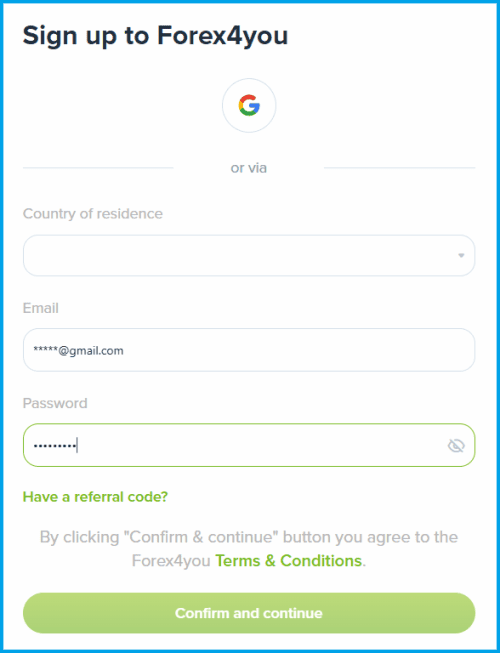
Let’s go through this registration form step by step:
- Country of residence — select your country
- Email — enter your email
- Password — create a password
- Click the "Confirm and continue" button
Next, on the screen you will see the window stating that you need to enter the verification code that the broker has sent to your email. Do not close the window until you enter the code.
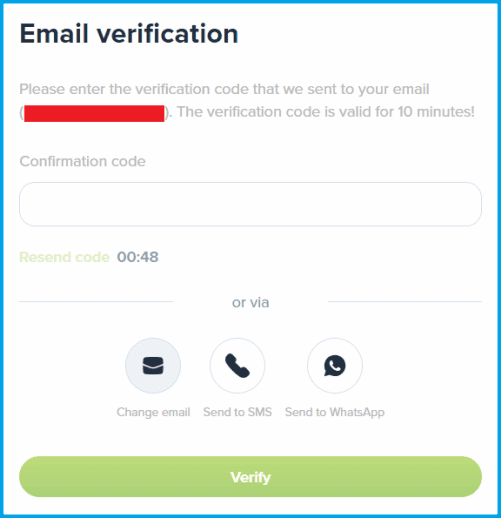
If the code does not arrive for a long time, you can choose one of the following options:
- Change email — the code will be sent to the new email you specify
- Send to SMS — the code will be sent via SMS to your mobile phone
After the code arrives at your email or phone, enter it in the "Confirmation code" field and click the "Verify" button.
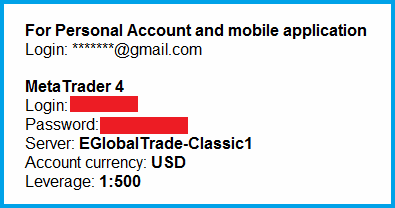
Next, you will receive an email from the broker confirming that the registration has been completed. The broker may also automatically open a trading account for you, and the email will contain your account details for this account.
Opening a Trading Account
You do not have to trade on the account that the broker opened for you when you registered your personal account. You can open trading accounts yourself in any number you need. To do this, in your personal account, go to the "Dashboard" section and click the "Add Account" button.
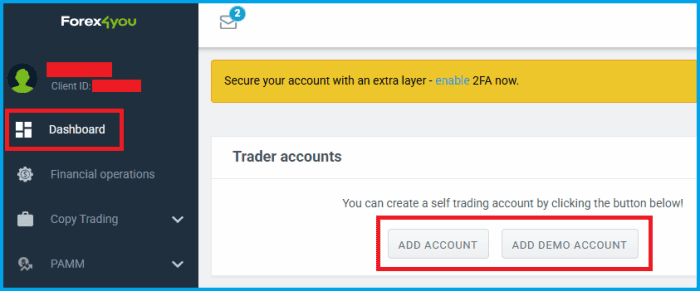
You will be taken to the page for selecting and opening all available trading accounts in Forex4you.
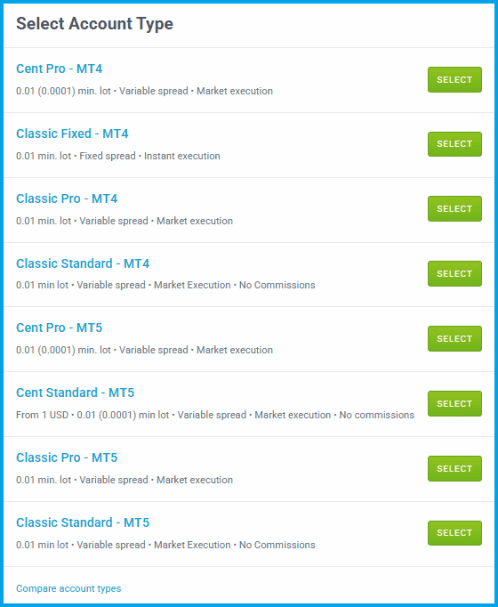
Select the trading account type you need and click the "Select" button.
The window with the following settings for the trading account you are opening will appear on the screen: currency, leverage, and swap. The "Trading conditions" field will show the conditions for this account.
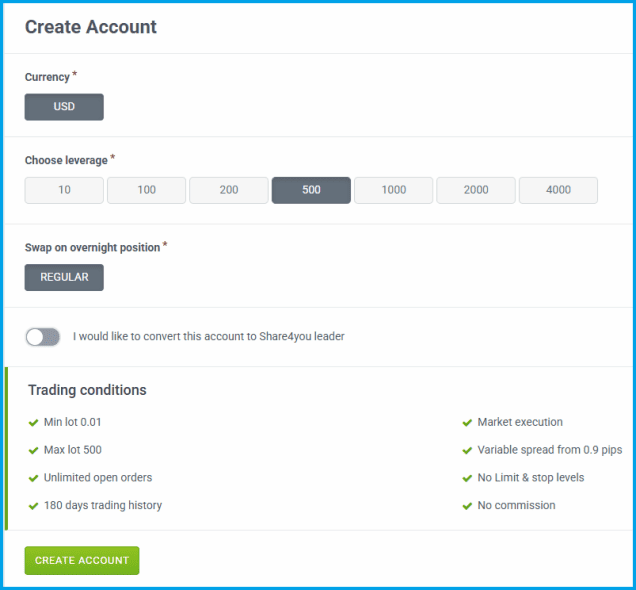
After configuring and selecting the trading account parameters, click the "Create Account" button.
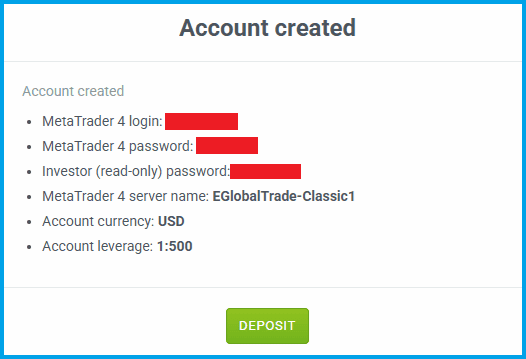
The trading account will be created automatically and instantly, and you will see the message on the screen with the account access details: login, password, server name, currency, and leverage. Write down and save this information, as you will use it to connect to your trading account.
Account Verification with Forex4you
Verification is required! Without it, you can trade on a demo account, but before depositing real funds and starting to trade, it is better to complete verification first.To start the verification process, go to your personal account settings and click the "Verification" link. A page with a form for entering your verification details will open; you must fill out this form completely.
Next, you need to upload photos (or scans) of the documents required for verification. The broker will ask you for a passport and a document confirming your address of residence. After uploading them, wait for confirmation that the verification has been completed successfully.
If you have any questions or cannot find the verification link in your personal account, please contact Forex4you support.
Wrapping Up
We have described in detail the entire process of registering a personal account, opening trading accounts, and completing verification with Forex4you. Go to the broker’s website via this link and get started.
- ✅ ECN, NDD, STP, and DMA
- 🌐 How to Register with RoboForex
- 📜 Cent Account
- 💱 Financial Regulators
- 👍 Offshore Brokers





 Reviews:
 Reviews:
 Reviews:
 Reviews: